
Share →
Buffer
metro-visualstudio-128-link

imageI have talked often of the idea of a Project of Projects in Team Foundation Server and with the new feature in Visual Studio 2012 Team Foundation Server I though it would make sense to revisit. I will talk a little of the idea of the Master or Hierarchical Backlogs using the new Agile Planning tools and I always find an example help with understanding so I will be using a recent engagement as a base. But first lets dispel a few myths.

  • Team Project ≠ Team
  • Team Project ≠ Project
  • Team Project ≠ Product
  • Team Project = WTF?

You might think that it has been unfortunately named, but the Visual Studio ALM tooling has been designed to have a low barrier to entry and as such the happy path is:

  • Team Project = Team
  • Team Project = Project

Have I confused you yet?

Well, for the single, or small group of developers the common and easy path is to create a new Team Project for each project and they will only ever have one team. So this is the way that it is out-of-the-box and it serves its purpose.

One Team Project to rule them all

The rest of us live in a more complicated world of multiple teams, multiple projects and multiple priorities. To achieve this we need to think about the following things in Team Foundation Server:

  • Teams (can be mapped to Area or to a Work Item Field Definition)
  • Areas (Tree)
  • Iteration (Tree)
  • Source Code  (has folders)
  • Work Item Queries (has folders)
  • Build

No matter what our configuration and requirements we can use a single Team Project. There are however a number of circumstances where you will not be able to do this:

  • A large consultancy

    If you are in a large consultancy with 1000+ customers then it makes more sense to use a  one Team Project per customer model so as to avoid confusion and scaling issues. Don’t think just because you are a consultancy that you need to use this model. Think carefully about your choice…

  • An organisation with 100’s of Teams

    If you are a single organisation that has 100’s of teams than you might also run into limitation of scale. I would in this case recommend that you have one Team Project per Department or Division depending on their scale and organisation.

  In these cases there are two limitation that need to be considered carefully. You can only have 254 areas per level and there is a soft limit of about 300 Team Projects per Team Project Collection. 

If neither of these apply (or you are at the Customer, Department or Division level within an organisation within which it does) then you can achieve a single Team Project.

One Team Project to find them

So, what has changed? Well with the advent of the idea and the technical implementation of Team in Visual Studio 2012 Team Foundation Service we can take advantage of the new constructs and reduce our complexity while simultaneously increase our features.

I do however have a reality check for those of you that want to use the new tools but work within a traditionally run organisation.

More than 34% of companies are now doing agile
Figure: More than 34% of companies are now doing agile

They are called the “Agile Planning” tools for a reason. They are exclusively targeted at the ~34% of the industry that are working in an Agile manor and that are 3 times more  likely to succeed than a traditionally run project. They are also aimed at the 30% that don’t really know what the want as an easy adoption path.
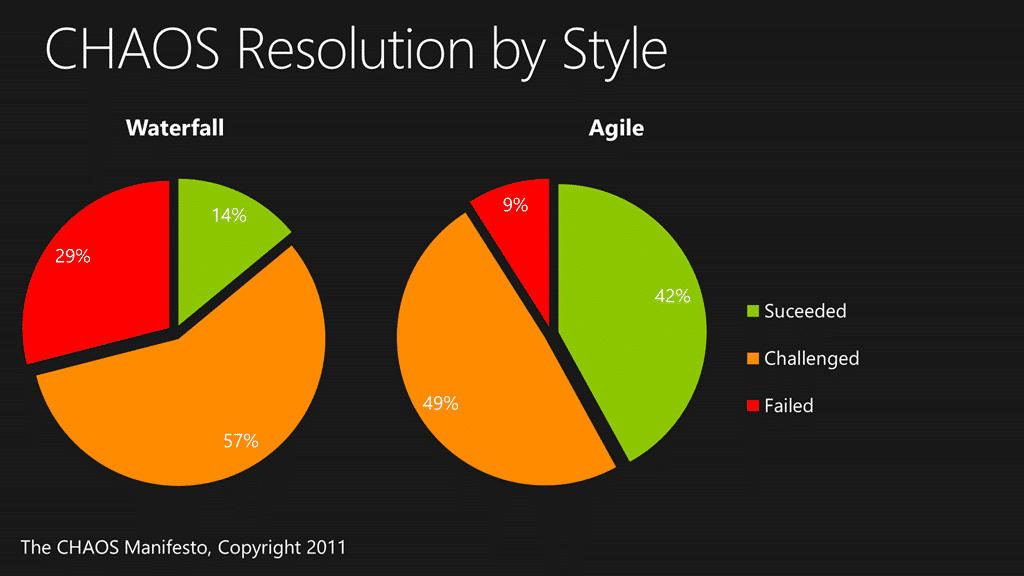
Agile projects are 3 times more likely to be successful
Figure: Agile projects are 3 times more likely to be successful

Does this mean that those of you can’t use the Agile Planning tools? Hell no! It just means that you are not in the happy path so make the most of them that you can.

One Team Project to bring them all

In a recent engagement my customer needed some rather specific things to be possible but also wanted to take advantage of the new Agile Planning features. They wanted to pull together all of the Teams and individuals from the Business all the way through the Development Teams to Infrastructure. To achieve that we identified a few must haves:

  • Must be able to see an ordered backlog per team
  • Must be able to see an ordered backlog per department/customer
  • Must be able to see what product and product area each work item is assigned to

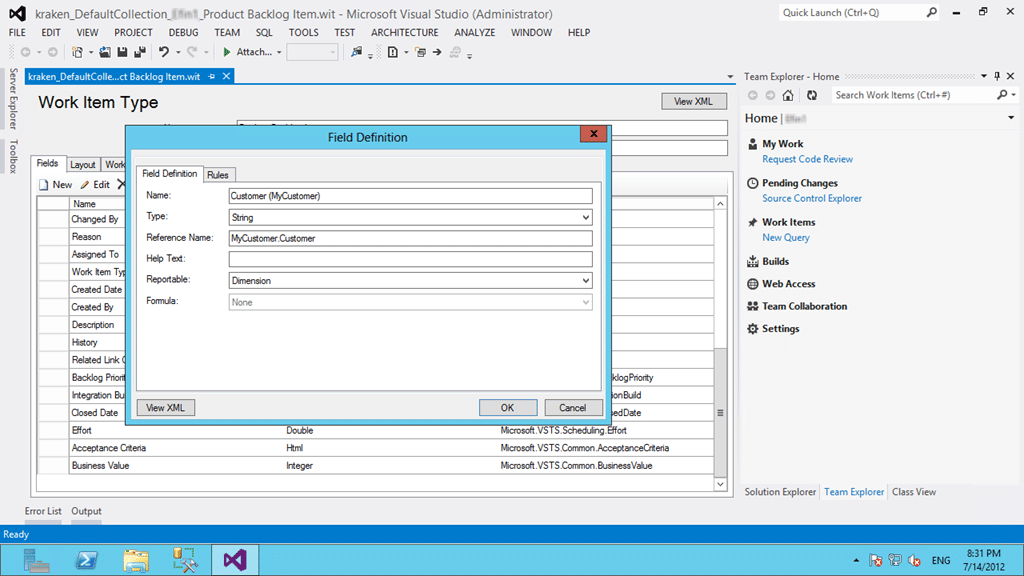
In order to achieve this all I need to customise is to add a single new field to the Product Backlog Item. Is we add a “[mycustomer].Customer” field to the PBI and make it a drop-down-list of all of the existing customers
image
Figure: Adding a field to store the external customer

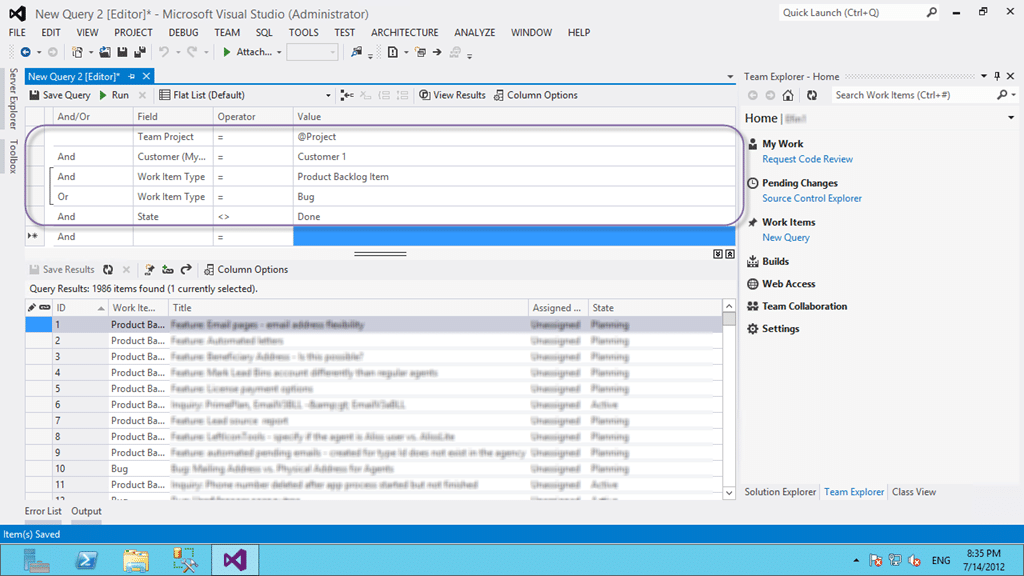
I can then create a query for each of the customers to show the backlog and allow anyone with permission to view that backlog.
image
Figure: A Query showing an external customers backlog

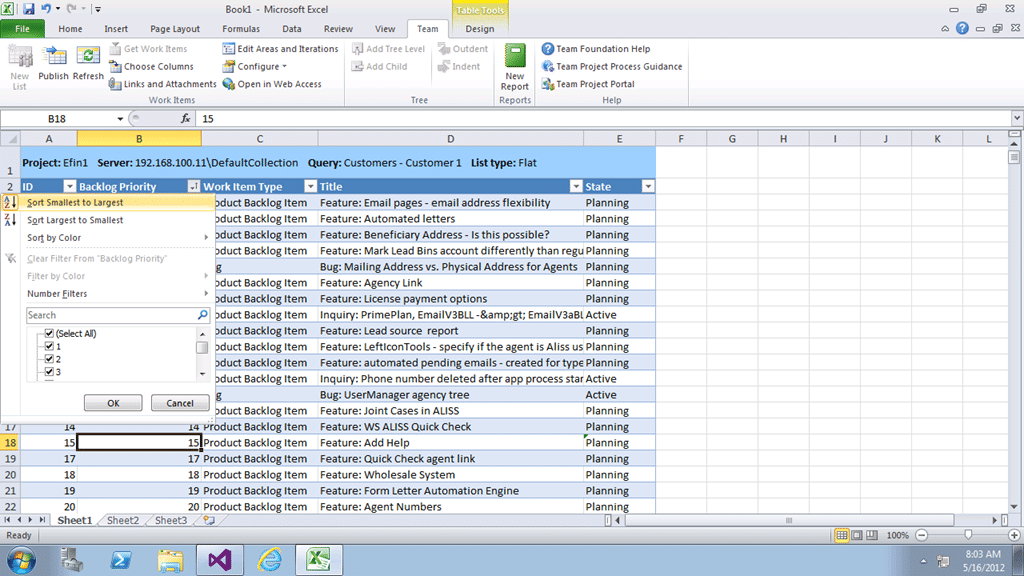
If I can query it I can then export to excel and reorder it just like we did when connecting to TFS 2010.
image
Figure: Reordering the backlog in Excel

So with a single added field we have enabled not only querying and ordering of data associated with a customer, but we also made the field reportable as a dimension in the data warehouse and cube.

Awesome and easy…

Now all we need to add is two teams in the new Agile Planning tools in addition to the default and configure them to only show their own backlog based on the Area Path (or we can configure it to use a Team drop-down).

The point is that we can support most, if not all configurations as long as you are willing to change the way that you work a little. Hopefully not much, but there is always change in adopting a new tool. Although we don’t want our tools to prescribe our workflow, we may actually want to change the way that we work to take advantage of cool things that we just had no access to before.

And in the Process Template bind them

220px-GollumThe key to a successful Team Foundation Server deployment is in the Process Template that is chosen to be the base moving forward. I always start with the Visual Studio Scrum template as a base as it has the most compatible workflow and terminology to the way we tend to speak and discuss about work.

Remember that whatever process template that you pick it is but a starting point for building your own process on top of. Don’t be afraid to customise, just don’t go nuts… no one likes a frankin-template…

Conclusion

Not only is larger Team Projects the recommendation of almost all of the experts in the field, it is also the recommendation and expectation of the product team for mature teams and organisations using Team Foundation Server.

How are Team Projects used at your organisation?

-Every company deserves working software that successfully and consistently meets your customers needs. We can help you get working software with continuous feedback so that you agile teams can deliver continuous value with Visual Studio, Team Foundation Server & Scrum. We have experts on hand to help improve your process and deliver more value at higher quality.

[subscribe] While we love helping you individually we provide much of our resultant consulting understanding here for you to use. By writing about our experiences we gain a better understanding of them ourselves. You can get notified of all content that we publish with our weekly newsletter and see exactly what we are doing and how we are doing it. [/subscribe]

Tagged with →  
Share →
Buffer
  • Pingback: Visual Studio 2012 RTM available & installed - Visual Studio ALM with Team Foundation Server, Visual Studio & Scrum

  • Pingback: When should I use Areas in TFS instead of Team Projects in Team Foundation Server 2010 - Visual Studio ALM

  • Pingback: Project of Projects with team Foundation Server 2010 - Visual Studio ALM from Martin Hinshelwood

  • Gavin Stevens

    I think it’s important to recognize and enforce these concepts:
    Teams (can be mapped to Area or to a Work Item Field Definition)
    Areas (Tree)
    Iteration (Tree)
    Source Code  (has folders)
    Work Item Queries (has folders)
    Build

    Iteration -> Time
    Area -> Space

    The Iteration / Area structure should describe your source control structure as to provide a natural implementation of the Work over Time.
    Too many companies may fall into the trap of customization and end up changing Iteration path to an iteration which has nothing to do with the underlying source control, or the releases they are trying to deliver, making the overall system much more complex to manage. 

    A companies focus should be on iterations of a release, which is actually describing the underlying source code branch, not iterations of a team or other functional unit.

    Area path too, in maturity, seems to “fragment” where it may have started out as a structural description of the underlying source.  Later in time area naturally starts to fragment as you try to store too much information in this single hierarchy.  Soon area path can become, component based, feature based, and functional all at the same time.

    Failure to follow a strict structure of iteration and area can causes a twist in the reality of “what source/where is supposed to change in this iteration / area ?”  The Iteration / Area should describe the underlying source code which is the object of change for this iteration.

    Make sure to stick to these basic principles of TFS’s architecture. 
    Iteration = Releases over time, broken down into as many time boxes as you want.
    Area = The thing changing over time, again broken down into as deep a depth as you want, but try to keep area describing a single dimension of data like (Structural, Functional, Feature Based) choose ONE,  add new fields which bind to global lists to your work items for the others.

    In the end TFS is simply a database of a few related work item types.  The entire utility of which to track change over time in a complex system.  Make sure you keep the dimensions TFS provides aligned with they way you branch and build your source code also.  

    In a complex, mature system, the basic fundamentals of storing source control, and tracking change in it over time cannot be ignored.

  • Pingback: One Team Project Collection to rule them all - Consolidating Team Projects - Visual Studio ALM

  • http://www.facebook.com/aaroncorcoran Aaron Corcoran

    With the concept of Teams, does one actually have to modify the queries any longer? As it seems in TFS 2012, each team has its own unique set of queries. Just getting started with the concept of teams mapped to areas, but it seems this reduces the management of queries (that was listed in the 2010 post). I may be missing a step, as I get the areas/iterations then assigning teams -> areas (for the one master backlog)…at least I think I do =) But wasn’t sure about the queries.
    Secondly, with the one master backlog, is it true to say that you wouldn’t be managing the overall release from the root project, each project would be managed separately. E.g. your not going to be assigning items from the master backlog to individual area sprints…that would be done through each ‘team’s area’.

    • http://blog.hinshelwood.com/ Martin Hinshelwood

      You are correct that you get queries, both “team” and “my” for each “Team” that you create within a Team Project. You also get Alerts per team. This is one of the biggest advantages of moving to TFS 2012 from the perspective of the management of work.

      To you second point… well it depends. You may indeed want a Master Backlog with some sort of hierarchy if you have many teams (10′s) working on the same or related products. That way you could have a single vision for large rocks that are disseminated between teams…

      • http://www.facebook.com/aaroncorcoran Aaron Corcoran

        Thanks for the reply. I’m just starting to get my feet wet with 2012 and like the team mapped to area approach. Looks like it is a perfect fit for most organizations. Manage the master backlog, assign it to team/areas, then each team can prioritize their own sub backlog and work the sprints accordingly.
        One follow up question. How do you handle a situation where one group might actually run sprints (during development), but others may just want to run a kanban board, basically no springs, just a prioritized backlog. Would you just advice that second team (Kanban team) to only use the backlog board and not the task board? Just curious to your thoughts on that.

        • http://blog.hinshelwood.com/ Martin Hinshelwood

          You are exactly correct…although I find that teams that do Scrum or Kanban also find value in a kanban or scrum boards respectively (capitalisation deliberate)

  • http://www.facebook.com/graham.bunce Graham Bunce

    useful but not possible AFAIK with hosted TFS as you cannot change the template. Any suggestions for one big team working on many projects each with their own release schedules (devs can work on any project, sometimes on two projects at once) that works without changing the templates and works on hosted TFS?

    • http://blog.hinshelwood.com/ Martin Hinshelwood

      I don;t understand what does not work with hosted TFS? All of the above works with both TF Server (Self-hosted & Hosted) as well as TF Service (Cloud) services… Nothing describes above requires you to change the template.

      You may be think of “Team Foundation Server 2012 Teams without Areas” which would require customisation, but you do not require to make that customisation to use many products and teams working in a single Team Project…

      Can you please specify what the issue is that you are encountering?

      • http://twitter.com/grahambunce Graham Bunce

        Hi,

        I may have misread your article but you say here:

        >In order to achieve this all I need to customise is to add a single new
        field to the Product Backlog Item. Is we add a “[mycustomer].Customer”
        field to the PBI and make it a drop-down-list of all of the existing
        customers.

        This is not possible with TFS Service

        • http://blog.hinshelwood.com/ Martin Hinshelwood

          Ahh.. I see the issue. The examples above were from a specific customer who did the “[mycustomer].Customer” field. That field is not required to create a single Team Project with many Products existing within it.

          “Nothing describes above ‘requires’ you to change the template. There may however be things that you would like to do that you would be restricted from in the Cloud.”

          I have many Team Projects on http://tfs.visualstudio.com that have many products without having to customize anything… What are you finding that you need?

  • http://twitter.com/ScoobyMcD Eric McDonald

    If you use a single TFS 2012 Project to manage business projects which exist in separate Areas how can you give each business project a separate home page (see screenshot)? You can add different backlog items from each Area (business project) onto home page, but it doesn’t look like you can create separate home pages. Scenario here is 2 teams of graduates working on 2 separate projects under same project manager – does this really require 2 TFS Projects or can you do it with one and give each team their own TFS 2012 Project home page?

    • http://blog.hinshelwood.com/ Martin Hinshelwood

      You need to create a “Team” for each group. That will give them their own homepage and backlog.

      • http://twitter.com/ScoobyMcD Eric McDonald

        Fantastic thanks! I’ve spent all afternoon trying to work that out…

  • Manish Jain

    As always, great article! I couldn’t agree more. Yeah, you don’t need new team project for a software project. It’s easy to manage with one team project (in our case, product company) and have great visibility. We have customized template (added functional area, product type etc) to filter/categorize items. I would create new team project when there is a group/team with completely different process. So let’s say company uses Waterfall process and newly acquired company uses Scrum.

  • http://www.facebook.com/laddish Rob Laddish

    Thanks for the great article. I work in a large company with our own TFS servers, and we have a wide spectrum of implementations. In some cases 1 TFS Project = 1 Product (and 1 team) and in other cases 1 TFS Project = 1 Division with 10+ products and 10+ teams, some of them are programs of teams, and others 1-2 person teams. We’ve been having this debate for quite a while.

    One thing you haven’t touched on is performance. We heavily use excel workbooks for project management, and the size of a project and collection have a HUGE impact. In some cases, the excel startup connection to TFS can take over a minute for a big project/collection, and in other cases it is as low as 10 seconds. We worked with Microsoft R&D for about a year on this issue. TFS2012 is slightly better as it will auto-delete old build entries in lists, but in TFS2010 we had to have custom SQL run every month to do this cleaning.

    We had been heading towards keeping our collections small, perhaps 1 per division, and our projects small. Another idea is to keep 1 collection per division, then just 1-2 projects in that collection, and make them mega-projects as you’ve described.

    Has anyone else tried both approaches and measured performance impacts?

    • http://blog.hinshelwood.com/ Martin Hinshelwood

      If it is in the same collection then regardless wither it is in one or many projects you should have the same performance. In multiple collections your bottleneck may be the app tiers or your network capacity.

      As to scale. DivDev (Microsoft Developer Division) has a single team project that is over 17TB in the database so scale in a single team project is not an issue. Although I acknowledge the problem that you seam to be having and that you need to make sure you clean your databases effectively at scale.

      If you email me directly on “[firstname]@[surname].com” I will put you in touch with one of my colleagues that has just had to split a collection for performance reasons. He does however have 300+ divisions in TFS so it may not be for performance but for maintenance… lets figure that our.

      Each subsistent update for 2012 should improve the performance as the product team optimising for scale on Azure with http://tfs.visualstudio.com